Account security: chatters never see your password
Updated on
On this page (9)
How we link your account, step by step
Linking happens in the FansTracker desktop app, which opens a window with OnlyFans' own login page. That's where your username and password are entered and your two-factor authentication is completed, just like signing in from a browser. FansTracker doesn't have a password form of its own, and it doesn't skip any of OnlyFans' checks.
Before linking anything, the app shows the profile it found and waits for confirmation. We do this with you on a call, so you can see every step. If the window is canceled or closed, nothing gets linked.
- You You type the password on the official OnlyFans page, inside FansTracker, on a call with us.
- OnlyFans Checks your login and two-factor authentication and opens a session. The password is not stored.
- FansTracker Keeps that session encrypted on its servers. Messages are synced from there.
- Chatter Only sees the chat of the accounts we assign. Neither the password nor the session reaches their device.
- No browser extensions to install.
- No cookies to copy and paste anywhere.
- No passwords sitting in group chats, spreadsheets or shared notes.
Where the session lives and who can use it
What's kept after linking isn't your password. It's the OnlyFans session, encrypted on FansTracker's servers. Messages sync and replies go out from there, so the team can work without the session ever reaching their devices or showing up on screen.
If OnlyFans ends the session, the account is flagged for reconnection and we link it again with you. No one can reconnect it to any profile but yours.
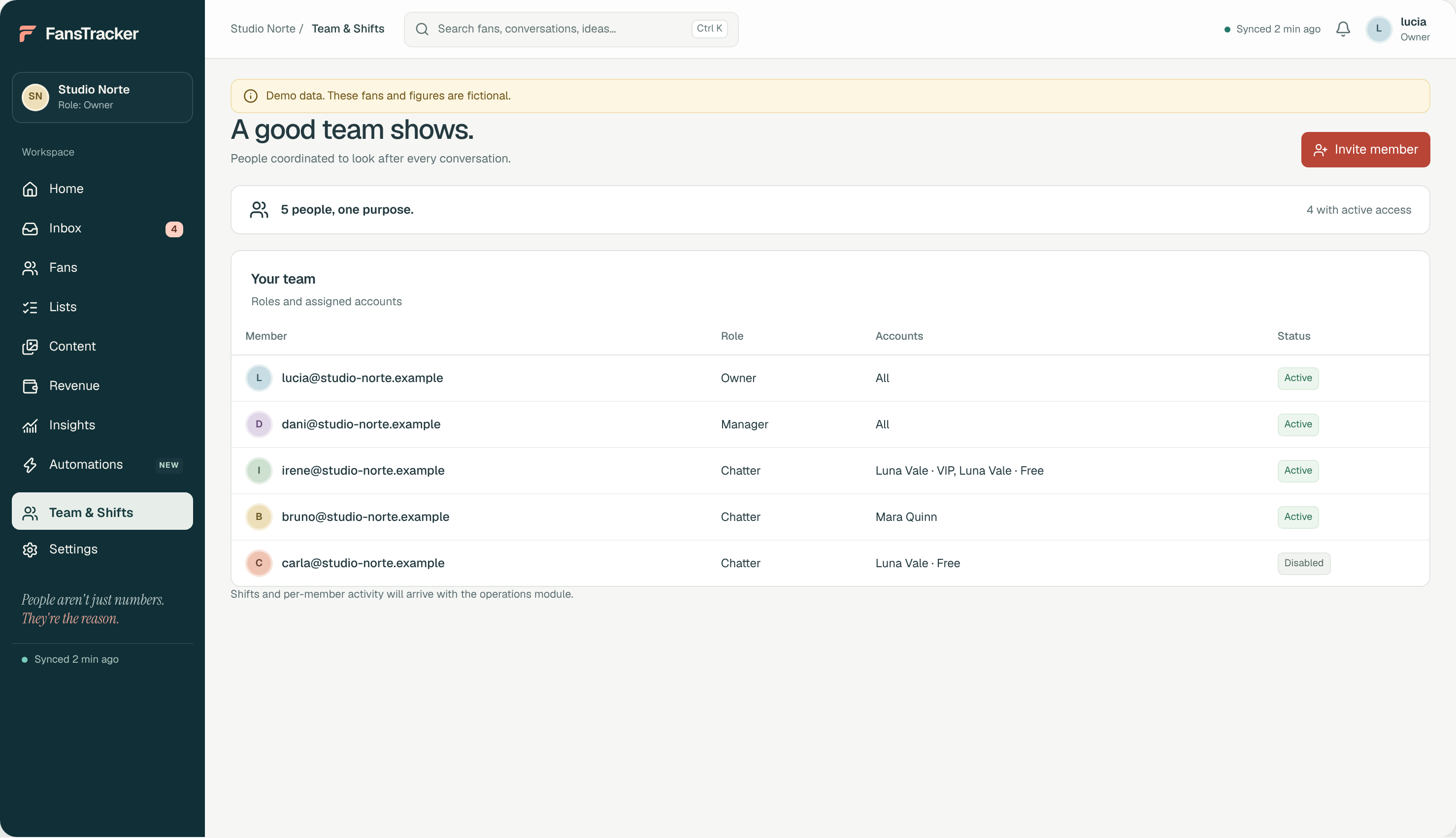
Who sees what: roles and per-account permissions
Everyone on the team signs in to FansTracker with their own login. Permissions are set by role and by assigned account, and each one is separate: reading the inbox, sending messages, writing fan notes, viewing content, viewing insights and exporting are all different permissions. Being able to read a chat doesn't mean being able to reply to it.
The app hides anything a role can't do, but the real protection is on the server, which re-checks the permission and the assigned account on every request. When someone leaves the team, their login is deactivated and they lose access right away.
- New chatters start on a single account with limited permissions.
- They only see the accounts of the creators they're assigned to.
- Exporting data is a separate permission that the chat team doesn't have.
Protection against duplicate messages
Every message sent from the inbox is logged before we try to deliver it, with a key that prevents the same delivery from being attempted twice. If OnlyFans doesn't clearly confirm delivery, the message is marked as unconfirmed. It isn't retried automatically, and blind resends are blocked until someone checks the chat.
The CRM also flags when a teammate is already replying to that fan. That way the fan doesn't get two different replies, and we don't sell them the same thing twice.
What data we store, and what we don't
The CRM stores what it needs to do its job: synced conversations, fans and their subscription status, internal notes, details about vault items and the activity that feeds the insights.
Some data is left out on purpose, and you can export everything we do store about your fans to CSV.
- Your vault files are never stored. We only keep each item's type, duration and date.
- OnlyFans lists are read live and aren't stored.
- Fan notes are internal. They're never sent to OnlyFans or to the fan.
- Your password isn't stored. It's entered on OnlyFans' own page.
What we recommend you do on your end
Security also depends on how your own account is set up. Before you start with us, or with any agency, go through this list.
- Turn on two-factor authentication for OnlyFans and for the email linked to your account.
- Keep the recovery email and phone number in your name, not the agency's.
- Don't send your password to anyone by message, not even a manager.
- Check your account's active sessions every so often.
- Ask for a written list of who has access and with which permissions.
What we can't promise
No agency or tool can guarantee that OnlyFans won't restrict an account, and we're no exception. OnlyFans' rules still apply to how we work on your account. What we do is avoid risky shortcuts: shared passwords, browser extensions, automation that mimics real people, or sending requests at an excessive rate.
We also don't promise to remove 100% of leaked content. Takedowns depend on each website and each search engine. We'll explain what can be done, and where the limits are.
What happens to access if you leave the agency
When we stop working together, we unlink your account from the CRM, turn off access for the whole team and hand over the export of your fan profiles and segments. Even though nobody on the team ever saw your password, we recommend changing it and signing out of any open sessions. It's a good habit with any agency.
Frequently asked questions
Do I have to give my OnlyFans password to an agency?
Not to the chatters, ever. At Ofagen, your account is linked once, together with you, by entering the password on the official OnlyFans login page inside the CRM. After that, it isn't stored anywhere. What remains is an encrypted session the chat team can't see.
Can a chatter take my fans or my content?
The risk never goes away completely, but it's much lower: the chatter doesn't have your password, can't export data and only sees the accounts they're assigned. Vault files aren't stored in the CRM, and any access can be revoked right away.
What if OnlyFans asks me to verify my login?
Two-factor authentication and OnlyFans' checks are completed on OnlyFans' own page while we link the account with you. The CRM doesn't solve or bypass them. If the session expires, we go through the process again.
Can using a CRM get my account banned?
No tool can guarantee that an account won't be restricted. FansTracker avoids the riskiest practices (extensions, shared passwords, excessive request rates), and OnlyFans' rules still apply to how we work.
Who at Ofagen can see my conversations?
Only the people assigned to your account, each with their own permissions. We tell you in writing who works on your account and what they can do, and anyone who leaves the team loses access right away.
Sources
Data checked against the official sources on the date shown. Platforms change their terms: check them before you decide.
Shall we look at your account?
Tell us where you are and we will send you a free audit with what we would change. No strings attached.
Get your free audit- No upfront fee
- No penalty if you leave
- Commission in writing before you sign